.svg)
Reviewing K3, DSv4F, and GLM5.2 Models for Real-world Energy Impact
An analysis of the energy performance between Kimi-K3, GLM 5.2 and DSv4F on Neurawatt Cloud.
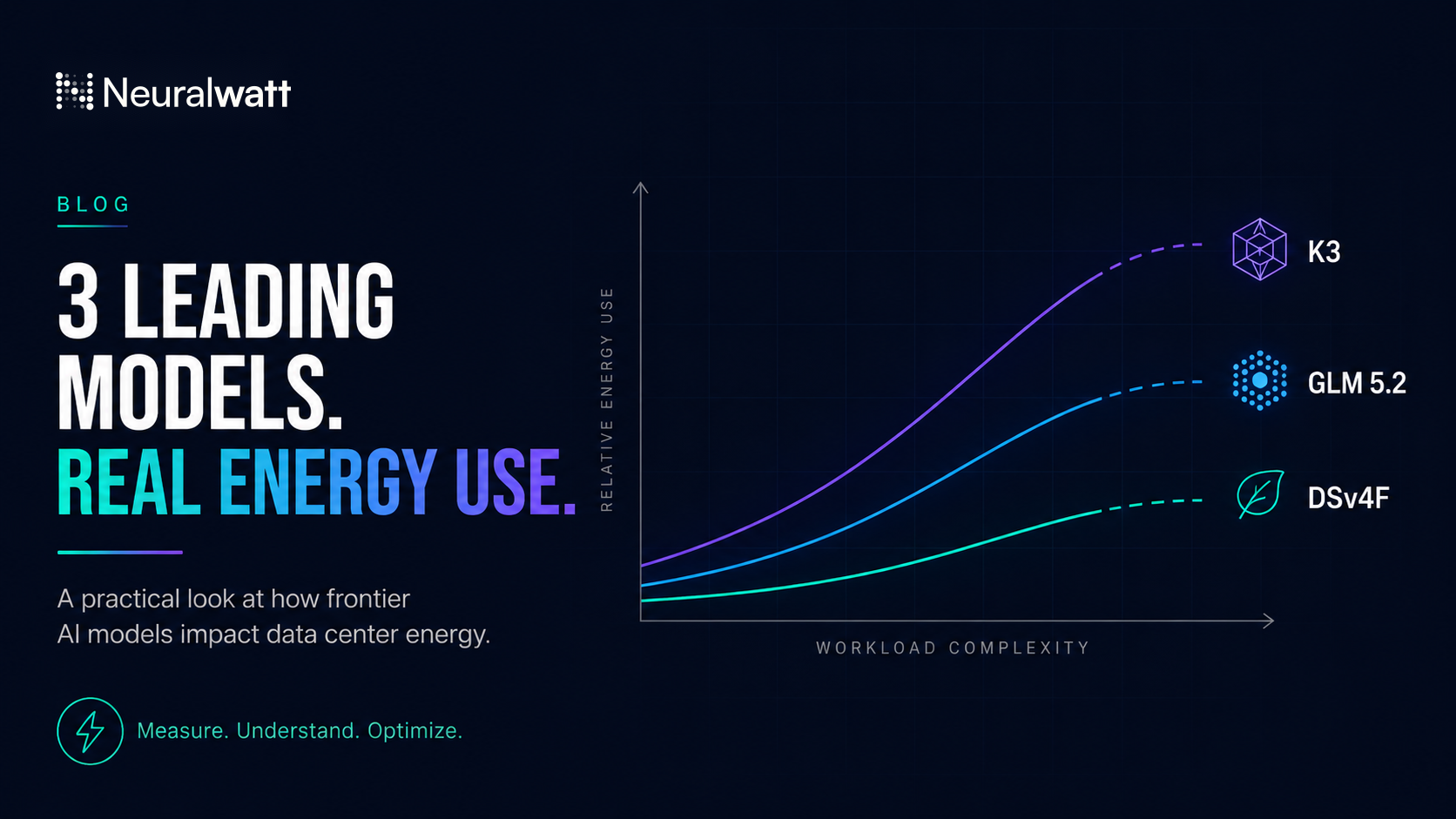
The last 2 months has delivered a large selection of new models with deep technical capabilities. At Neuralwatt we have a unique perspective and deep insight in to how they are impacting data center energy use. I also like that these three models span different sizes and technical capabilities and provide us a unique opportunity to contrast that with the amount of compute and resources required to run them. What i'm putting below is some data and some high level commentary on what we are seeing as real use in our cloud and not necessarily a scientific analysis for comparison. The main challenge for a real a/b comparison is we host different models on different hardware and in slightly different configurations based on our resource optimization (across H200, B200, and B300 with different levels and amounts of cache). Though what we are seeing is the model architectures and behaviors are driving much more of the different in the energy use than hardware at this point.
The first thing to note is that we are seeing the upper end of total model parameters and total activated parameters grow with K3 at 2.8 trillion parameters and 104 billion active, GLM 5.2 at 753 billion parameters and 40 billion active, and Deep Seek V4 Flash 0731 (DSV4F) at 304 billion parameters and 13 billion active. Each of these models also now provides 1M total processing context. This essentially sets the energy floor for each model of what processing a token costs. I'm not going to go into the benchmarks but you can view them here https://artificialanalysis.ai/evaluations/artificial-analysis-intelligence-index but their capabilities roughly scale with number of active parameters. But since we are focused on what the impact looks like in practice lets go to our data.
I pulled the last 24 hour of energy sample data from our service to help with this. We also provide a live energy status page on our site where you can see estimated energy per request https://portal.neuralwatt.com/energy-pricing.
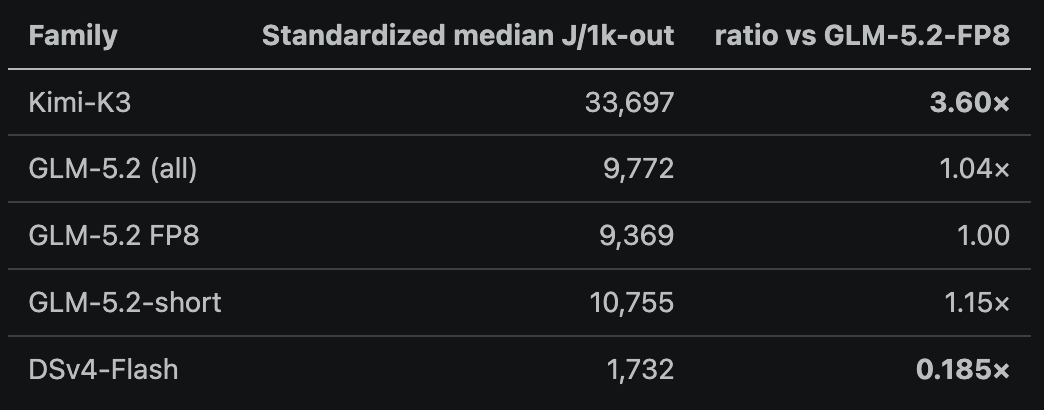
So if we treat GLM5.2 as the standard we can see that K3 is using about 3.6x energy per 1k output tokens while DSv4F is about .19x of GLM 5.2.

The energy ratios between uncached prefil and decode tokens are also interesting areas where models diverge. We can see in our sample that K3 has a very large divergence in decode energy with a much higher energy per completion token relative to a prefill-token.
But this isn't the whole story as how these models get used and how they tend to use thinking, tool calls or agentic sessions tends to also drive energy differentiation which we can also see. Our users discriminate on the types of tasks they drive to different models but its worth understanding that the models themselves tend to drive agentic loops differently.
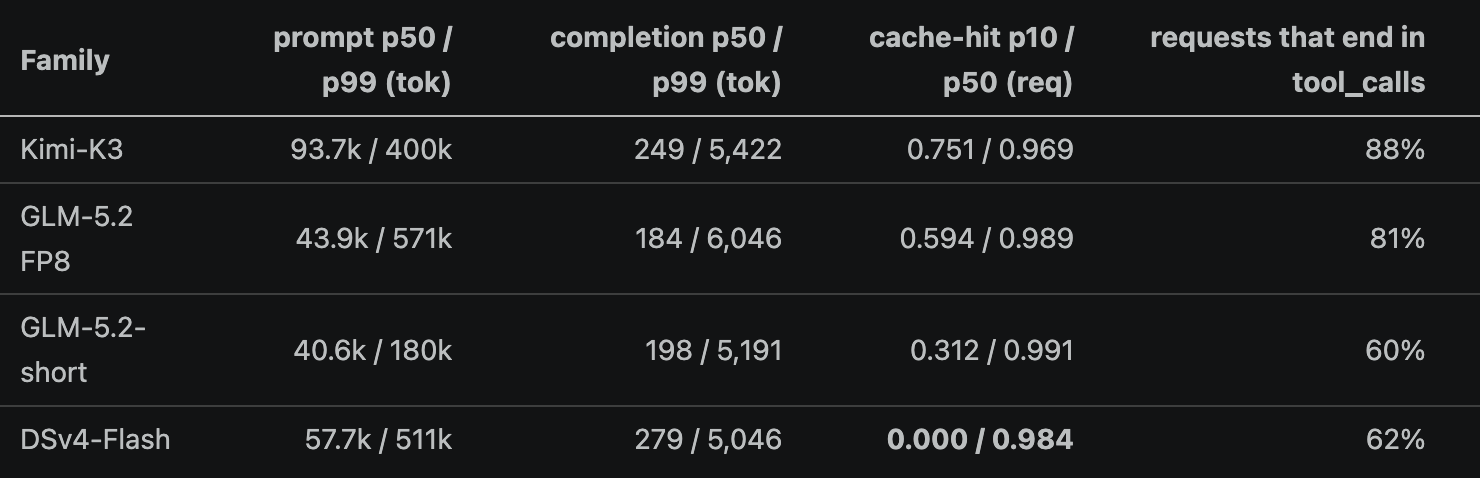
One thing that always blows me away when looking at these stats is the prompt to completion ratios. Agentic work, which is the vast majority of work on our platform, is highly input skewed meaning to drive energy efficiency we have to be very efficient with cache hits which keep prefill energy down.
We've looked at per token and per request stats so far but what about sessions which essentially bound an end-to-end task over a set of requests. One thing to note before diving in to these numbers is alot of our customers are using sub-agents and might configure sub-agents to use a cheaper model as one of the best practicies for speed and cost while maintaining good results which skews this sample for smaller models to have more singleton requests.
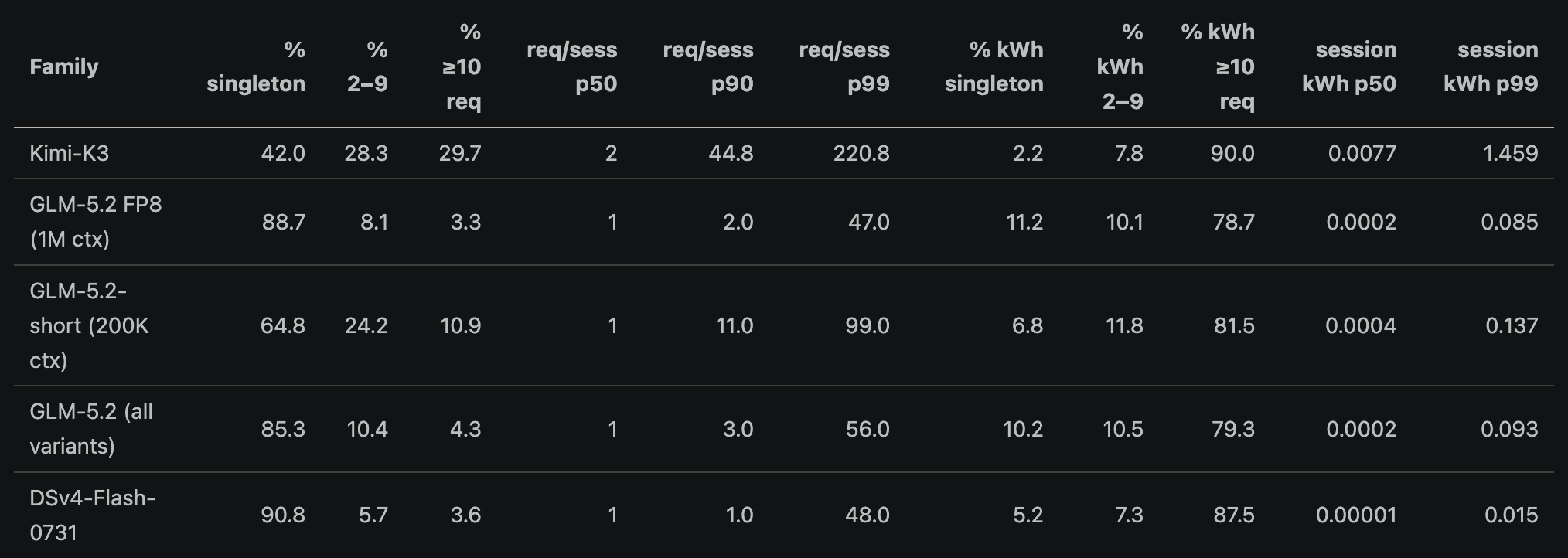
Longer sessions, while less than half of all sessions, end up being the primary driver of energy use. Just as managing the correct amount of thinking tokens has become important for per-task cost management, I also believe developing techniques to manage session success criteria and multi-turn optimization is also going to be an emerging driver of cost and efficiency optimization. Its really clear here that K3 hs an extreme outlier in the amount of requests it makes per session. This is on top of it already using over 3x the energy per request making this a very costly model from the point of view of energy.
Anecdotally we have adopted K3 internally for a lot of tasks that were more open ended and required more exploration while we tend to keep more specific feature development on GLM5.2 and tasks on DSv4F.
As one last exercise just to put another view on this I did this analysis 3 times, one with each model we reviewed and summarized the total energy for that session. K3 took .32 kWh to complete the work in this session (its tables are the ones I have shared above), GLM 5.2 took .17 kWh and .007 kWh for DSv4F. From a subjective point of view the GLM analysis had the most data though some of it wasn't fully normalized or focused on the specific asks for the prompts while DSv4F was fast it provided the most focus but fewest statistical insights and also wasn't fully normalizing or the data and didn't fully complete every piece of the task and K3 was the one I prefered but I could have easily iterated on the GLM or DSv4F reports to get them to the same point with more time and effort.
If you care about the energy resource impact of you AI what can you do with this data? First off is just to understand there is a difference and picking the right model for the right task can have a huge impact. Second, and its kind of implicit in the data above, is make sure you are getting good cache hit rates from your provider. This is actually the single biggest thing you can easily help or hurt from a user point of view. We see plugins frequenly incorrectly prepending data to a request which entirely breaks the ability to make a cache hit. One thing I do is my main agent, Oh My Pi, has a plugin which compacts a session when it detects it idle, this allows the compaction to happen before the cache gets evicted saving in overall energy.
We continualy work to disect and optimize different ways to keep the energy impact of these models low so stay tuned as we do more with this. Feel free to give it a try here: https://portal.neuralwatt.com/pricing